Lenovo drivers for your model
Get Lenovo drivers from Lenovo Support: enter your serial number or let the site detect your PC, then download the drivers listed for your exact model. On most Lenovo laptops, the Lenovo Vantage app can check for and install the same updates for you.
Checked October 30, 2026 against the manufacturer's own pages.
Lenovo drivers by product line
| Product line | Type | What to know | Open |
|---|---|---|---|
| ThinkPad | Business laptops | Business ThinkPads can use Lenovo Commercial Vantage; the T series page is shown here. | Drivers on pcsupport.lenovo.com |
| IdeaPad | Home laptops | Type the serial number in the Lenovo Support box to reach your IdeaPad's own downloads. | Drivers on pcsupport.lenovo.com |
| Legion | Gaming laptops | Legion laptops get graphics, BIOS and chipset drivers from the Legion series page on Lenovo Support. | Drivers on pcsupport.lenovo.com |
| Yoga | 2-in-1 laptops | Yoga models are listed by series; pick yours, then check the Windows version before downloading. | Drivers on pcsupport.lenovo.com |
| ThinkBook | Small business laptops | ThinkBook pages list drivers by machine type, which is printed on the same label as the serial number. | Drivers on pcsupport.lenovo.com |
| ThinkCentre | Business desktops | ThinkCentre M series desktops are managed with Lenovo Commercial Vantage, not the home Vantage app. | Drivers on pcsupport.lenovo.com |
Each link opens the maker's own support page for that product line, checked on October 30, 2026. Pick your exact model there.
Looking for a chip driver (Wi-Fi, graphics, audio, chipset)? Open the full driver list with the latest official versions.
The short version
What to install and where it comes from. Every link goes to the manufacturer or Microsoft, never to a copy.
Official files only, nothing bundled
Step by step
Find your serial number
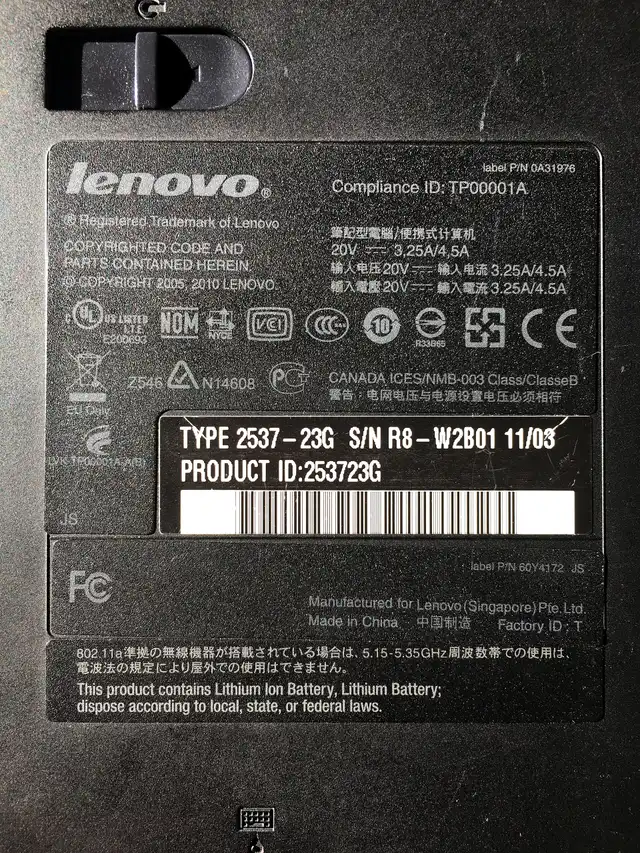
It is printed on the sticker under a laptop or on the back of a desktop. In Windows you can also open PowerShell and type Get-CimInstance Win32_BIOS | Select-Object SerialNumber, or look in Lenovo Vantage under device details.
Open your model's page on Lenovo Support
Enter the serial number on Lenovo Support, or choose the option to detect your product. The site then shows only the drivers made for your machine type.
Pick the right Windows version
Set the operating system filter to the Windows version you run, for example Windows 11 64-bit, so you do not install a driver written for an older release.
Install the most important drivers first
Chipset and BIOS updates come first, then graphics, audio, Wi-Fi and Bluetooth. Restart when an installer asks you to.
Let Lenovo Vantage keep them current
Open Lenovo Vantage, go to the system update section and run a check. It lists the same Lenovo-approved drivers and installs the ones you select.
Why your serial number matters
Lenovo sells the same product name in many configurations. Two ThinkPads with the same name can have different Wi-Fi cards, screens and audio chips. The serial number tells Lenovo Support exactly which parts are inside yours, so the driver list only shows what fits.
BIOS updates need extra care
A BIOS or firmware update is not a normal driver. Plug in the charger, close other programs and do not turn the PC off while it runs. If your PC works well and the update notes do not mention a problem you have, it is fine to wait.
When a Lenovo driver will not install
Check that the driver page lists your exact Windows version. Then restart, run the installer again as an administrator, and if it still fails, remove the old driver in Device Manager (right-click the device, Uninstall device) before installing the new one.
Questions
Should I use Intel or AMD drivers instead?
On a Lenovo laptop, start with Lenovo's own driver. Lenovo tests drivers against its hardware, power settings and special keys. Use the chip maker's newer driver only if Lenovo's version causes a problem it fixes.
Is Lenovo Vantage required?
No. It is a convenience. Every driver it installs can also be downloaded by hand from your model's page on Lenovo Support.
Why does Windows Update offer a Lenovo driver?
Lenovo publishes many of its drivers to Microsoft, so Windows Update can deliver them. Look under Settings, Windows Update, Advanced options, Optional updates.
My model is not listed for Windows 11. What now?
Lenovo only lists drivers it has tested for that Windows version. If your model was never released for Windows 11, Windows Update may still supply generic drivers, but some features can be missing.